
Order Blocks Suite
See where institutional money is sitting — before price gets there.
Watch The Below Video!
Order blocks are where the big money placed their orders.
When price returns, those orders are still waiting.
This suite finds them automatically. Across 8 timeframes. With quality scoring.
So you know which levels matter most — before you trade them.
Almost INSTANT TradingView access. Any chart. Any market. Cancel anytime.

Most traders are trading blind.
Not because they’re stupid.
Because the tools they have only show them one timeframe.
One set of order blocks. No scoring. No tracking. No alerts when price approaches.
They place trades at levels that look right on the 15-minute chart —
and get steamrolled by an untouched order block on the 4H they never saw.
Order Blocks Suite shows you every timeframe. Simultaneously.
Scored by quality. Tracked automatically. Alerted in real time.
You stop guessing. You start seeing.
THE COMPETITION DOESN'T COMPARE... AND IT IS NOT EVEN CLOSE
How Does Order Blocks Suite
Stack Up Against The TOP Competition?
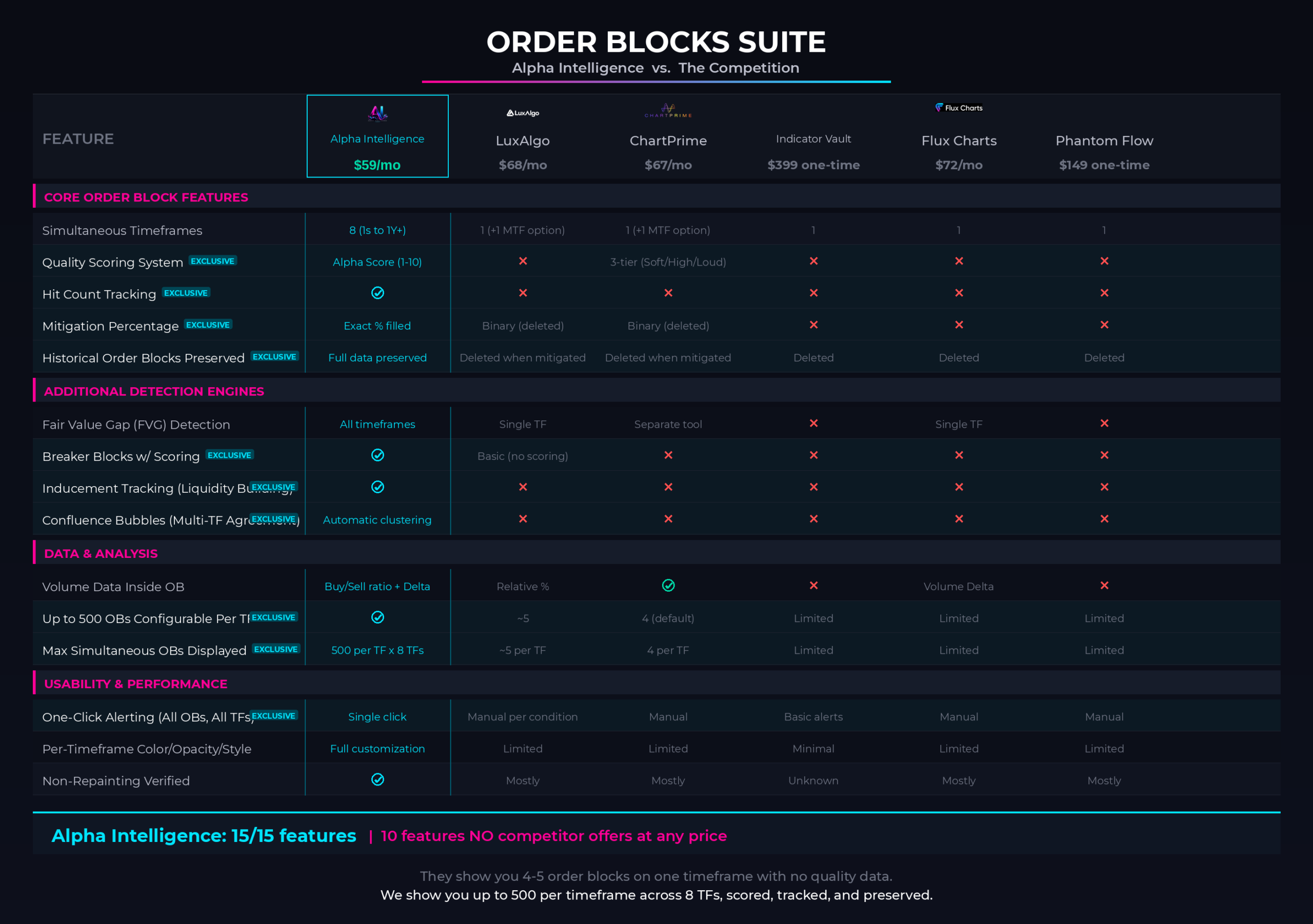
Order Blocks Suite offers features that no other indicator on the market offers, and significantly outperforms anything available to date. Here is how…
*Click on the image below to zoom in.*
- ✕
- There is not a SINGLE indicator in the market that actually offers the “Multi-Timeframe Naked Institutional Order Block Levels”. Every wondered… WHY?
- ✕
- LuxAlgo shows you order blocks on ONLY one timeframe.
- ✕ChartPrime’s Built-In Order Block Indicators do not have Cluster, Volume Weighted, or Scoring Technology.
- ✕Indicator Vault’s Order Block Indicators Don’t Give You A Real Edge.. They’re Inaccurate.
- ✕Flux Charts‘ Indicators Don’t Have Multi-Timeframe Order Block Detection.
- ✕Ours has 10 features that no other indicator in the ENTIRE indicator’s market offers. This isn’t a FEATURE GAP, it is a NEW CLASS of TECHNOLOGY!
THE ALPHA INTELLIGENCE NAKED ORDER BLOCKS SUITE
A Complete Institutional Toolkit. One Subscription.
FEATURES & SPECS
ABOUT ORDER BLOCKS, BREAKER BLOCKS, & FAIR VALUE GAPS
ORDER BLOCKS
•
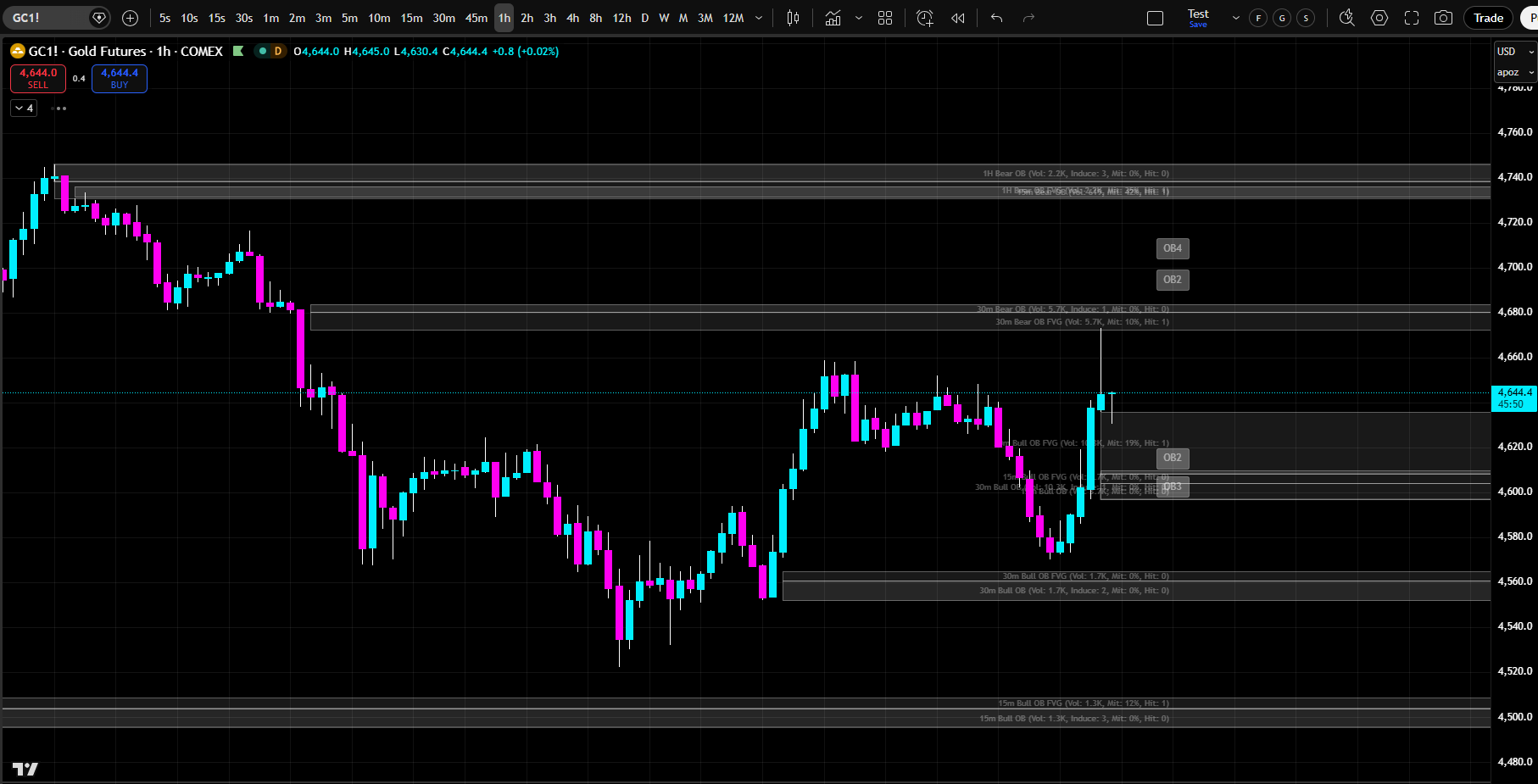
Professional traders use order blocks as their primary trading levels. They understand that order blocks are where institutional traders have accumulated positions.
•
They know that when price approaches an order block, a reaction is likely. They trade order blocks as high-probability signals.
•
Institutional traders do not place orders at random. They accumulate positions at specific price zones, and when price returns to those zones, the remaining unfilled orders create predictable reactions.
•
These zones are called order blocks — the footprints of institutional activity on your chart. An order block is the point where the big money committed.
•
When the market returns to that zone, the original orders get filled, and price reacts. The stronger the original displacement, the more significant the zone.
•
The Order Blocks Suite detects these zones automatically across up to 10 simultaneous timeframes using two independent detection engines — a proprietary engine for maximum precision, and a standard engine for broader coverage.
•
It tracks the full lifecycle of every order block from detection through mitigation, scores each one for quality, identifies where multiple timeframes agree on the same zone, and even detects order blocks from lower timeframes while you view a higher timeframe chart.
•
Fair Value Gaps, Breaker Blocks, inducement tracking, and a complete confluence system are all built in. This is how institutions trade — now you can see exactly where they are concentrated.
•
If you were to plot every Order Block, Breaker Block, & FVG (on every timeframe) manually, it would take you hours to do, on just a SINGLE chart / asset.
•
Our Suite does it in just SECONDS and can plot them FOR YOU on every chart you pull up in TradingView forevermore.
This is how institutions see the market, and where they do business — now you can too.
FAIR VALUE GAPS
•
A Fair Value Gap is the space between the order block candle and the displacement candle — the area where no trading occurred.
•
The FVG represents an imbalance in the market. Price will often return to fill this gap before continuing in the direction of the move.
•
Order Blocks Suite displays FVG boxes separately from order block boxes.
•
See exactly where price will likely return to fill the gap.
•
Trade FVG fills as high-probability signals.
BREAKER BLOCKS
•
A breaker block is an order block that was fully engulfed by price without being touched first.
•
This means price moved so fast that it skipped over the order block zone entirely.
•
When price later returns to a breaker block, the reaction is often stronger than a normal order block.
•
Treat breaker blocks as high-priority trading levels.
•
They represent zones where orders were not filled during the initial move, so the market is even more eager to fill them on the return.
MULTI-TIMEFRAME ORDER BLOCKS CONFLUENCE
Know exactly where institutional orders are positioned – BEFORE price gets there.
•
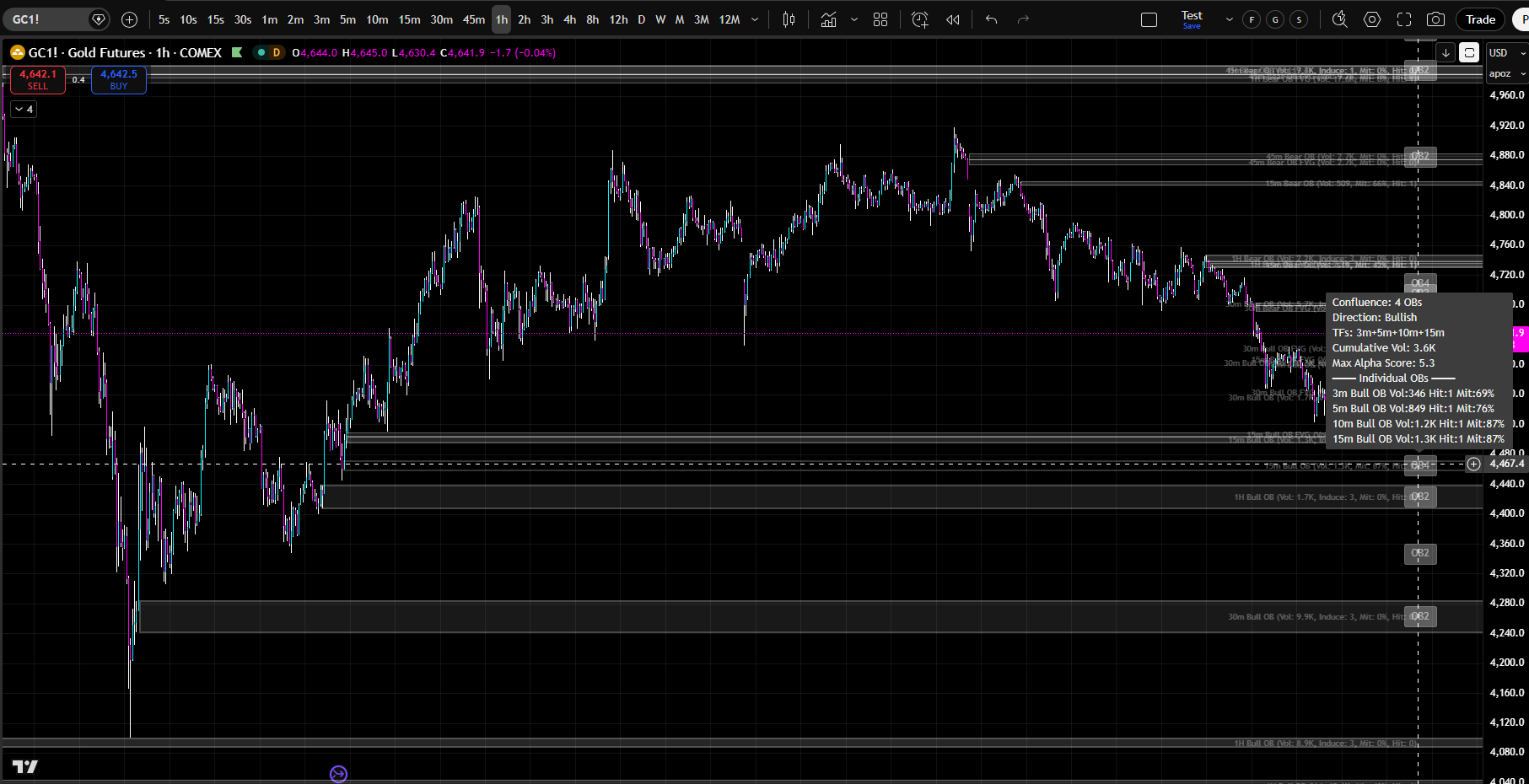
Order Blocks Suite calculates order blocks simultaneously across seven lower timeframes plus your chart timeframe. When multiple timeframes have order blocks at the same price zone, that is institutional confluence. That is where the strongest reactions occur.
•
Imagine seeing that the 1-minute, 3-minute, 5-minute, and 15-minute timeframes all have order blocks that overlap in the same price zone.
•
That is not just a trading level. That is a high-probability reversal zone. That is where institutional traders across multiple timeframes have accumulated positions.
•
That is where price will react with force.
•
This is what Order Blocks Suite shows you.
•
This is what separates professional traders from retail traders.
•
Order Blocks Suite automatically identifies confluence zones where multiple order blocks from different timeframes overlap.
•
These are the highest-probability trading zones.
•
When price approaches a confluence zone, prepare for a strong reaction.
•
Confluence zones are where institutional traders across multiple timeframes are positioned.
•
They are where the most institutional orders are waiting to be filled.
•
They are where price is most likely to reverse or accelerate.
WHAT IS INCLUDED IN ORDER BLOCKS SUITE?
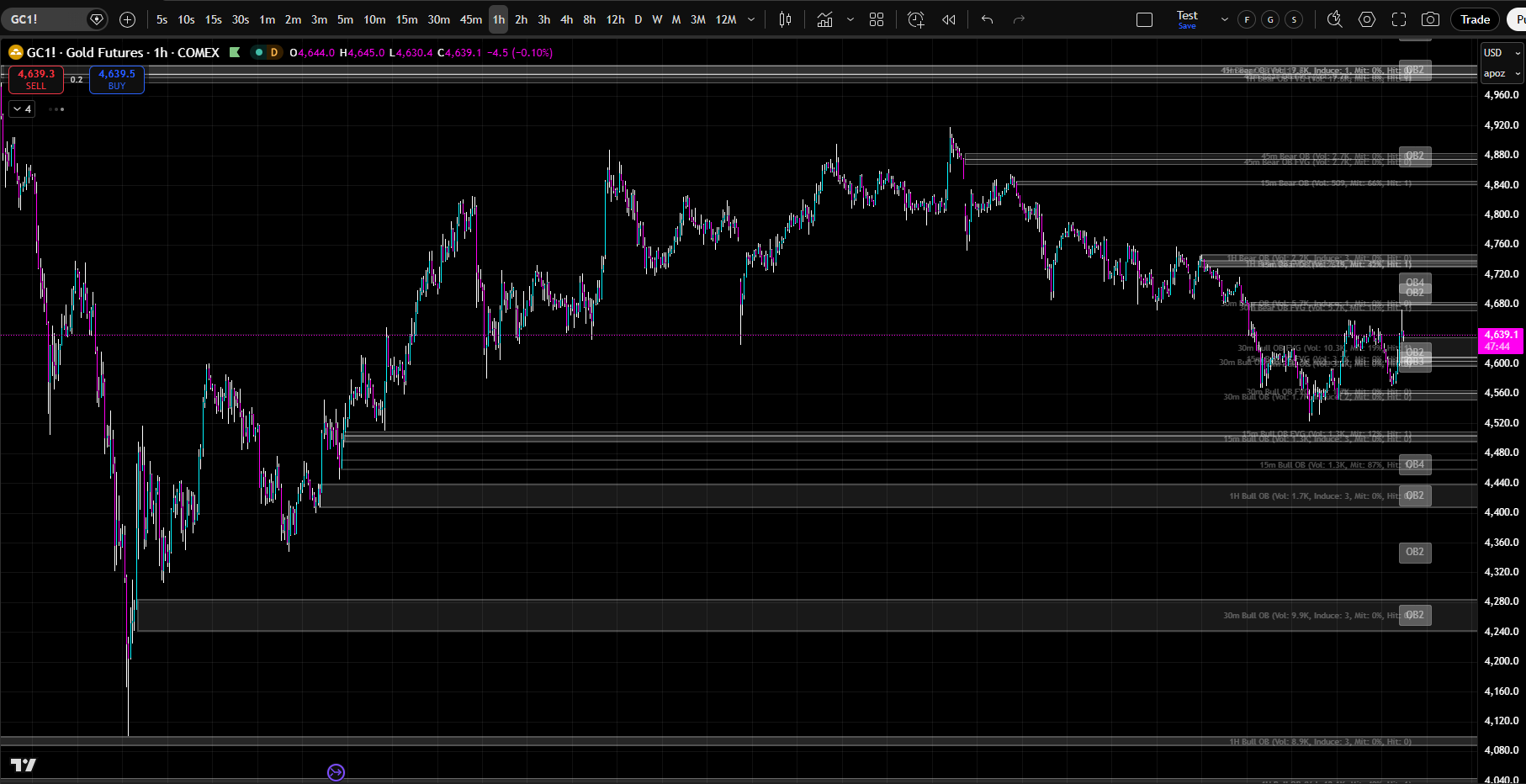
Dual Detection Engines
•
Proprietary Engine: Alpha Mode – fewer, but higher-quality order blocks
•
Standard Engine: catches more OBs, faster detection – potentially lower quality OBs
•
Switch between engines anytime with a single dropdown
Full Lifecycle Management
•
Active → Hit → Partially Mitigated → Inducement → Historical/Mitigated
•
Progressive mitigation percentage tracked and displayed (e.g., “Mit: 35%”)
•
Customizable OB Kill threshold (configurable) marks the OB as fully mitigated and deletes it from your chart (stored as a historic level so you can always pull it back up in “HIT/Historical Levels”)
•
Standard engine supports zone shrinking — the box physically reduces as price fills it.
Proprietary Alpha Score System
•
Quality rating (1–10) for every order block
•
Highlight threshold (default 7) visually emphasizes only the highest-quality OBs
Mirror Aggregation System
•
Detect lower-TF order blocks while viewing a higher-TF chart
•
For Example: See 1m, 3m, 5m OBs on a 1H chart without switching timeframes
•
Killed-zones registry prevents “zombie” re-detection of mitigated OBs
WHAT DOES ORDER BLOCKS SUITE AUTOMATICALLY PLOT ON YOUR CHART?
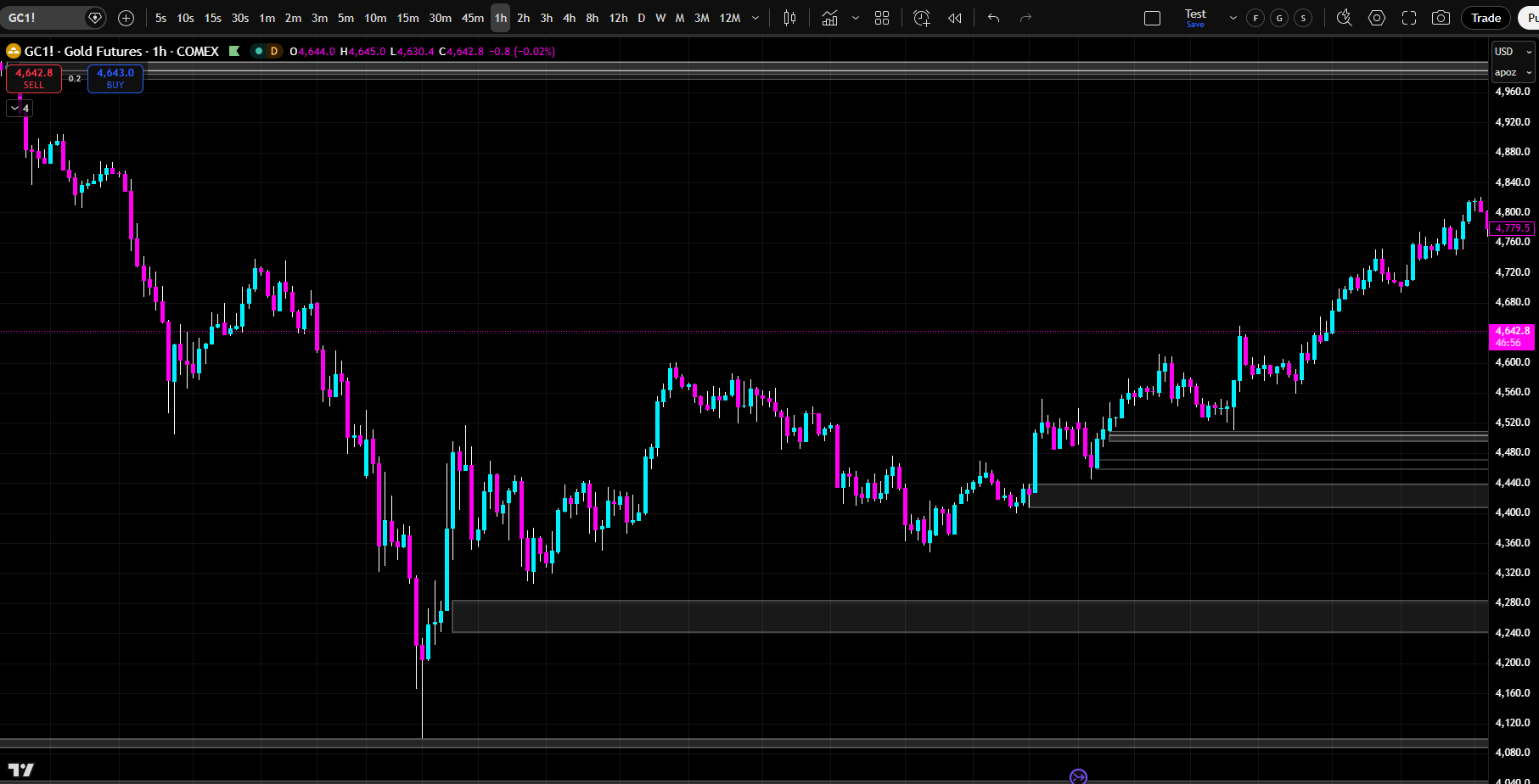
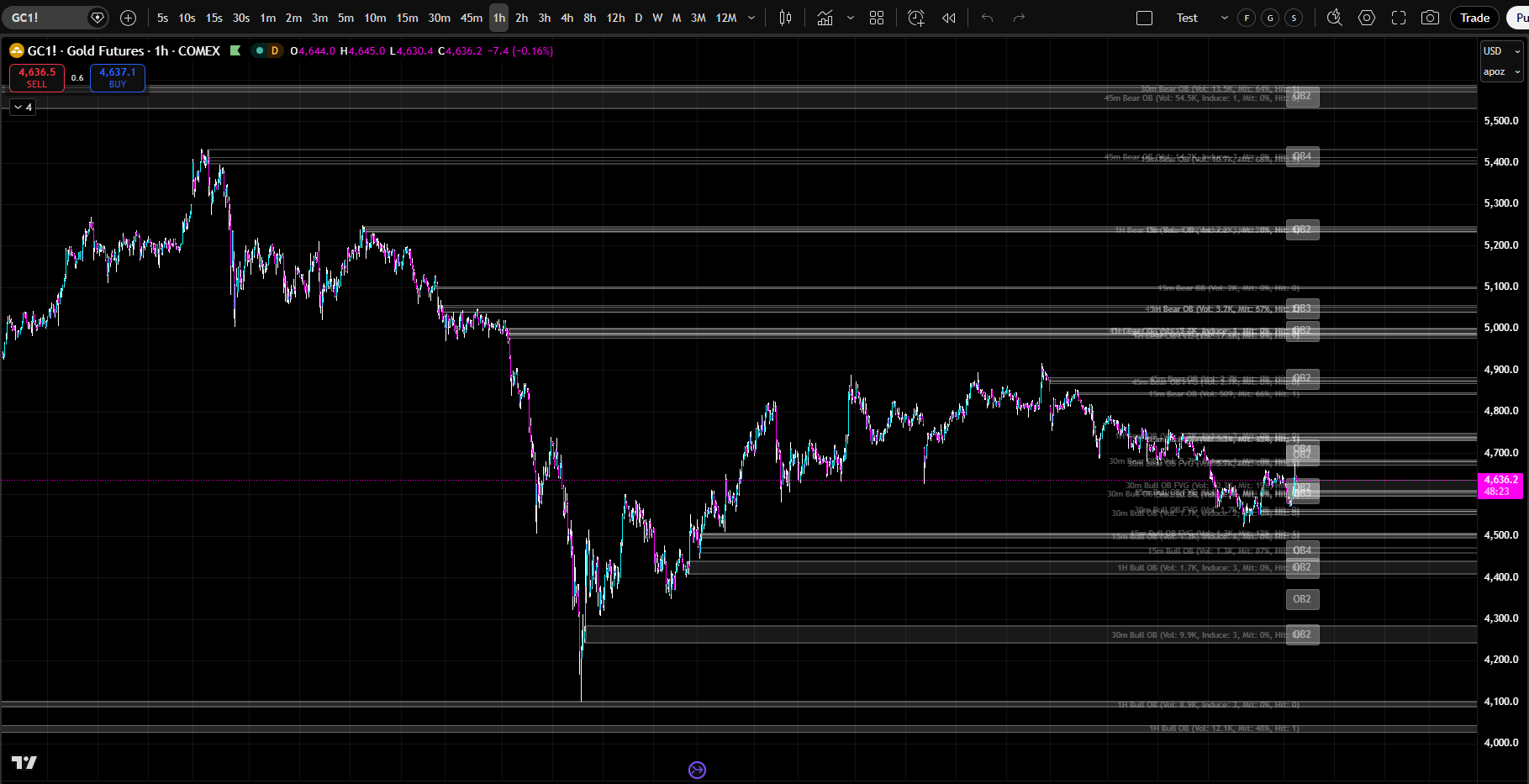
8 Timeframes (7 Lower + Chart TF)
•
View Order Blocks from up to 7 independent lower timeframe slots (default: 1m, 3m, 5m, 10m, 15m, 30m, 45m, 1H) in conjunction with the native timeframe you are viewing
•
Each slot is sovereign with its own order blocks, lifecycle, and styling
•
Fair Value Gap (FVG) Detection
•
Identifies the gap between an OB candle and the displacement candle
•
FVG boxes displayed adjacent to OB boxes with lighter opacity
•
FVG has its own mitigation tracking (51% kill default)
•
Configurable minimum FVG size (choose your own “size” of FVG, so you only see the FVGs you deem valid)
Breaker Blocks
•
Often produce stronger reactions than normal order blocks
•
Independent enable toggle and full styling control
•
Optionally included in confluence calculations
•
Confluence Zone Detection
•
Automatically identifies overlapping OBs from different timeframes
•
Customizable overlap percentage so you have full control
•
Confluence boxes displayed with higher opacity than individual OBs
•
Breaker Blocks optionally included in clustering
•
Configurable right offset for confluence box placement
Hit Count, Mitigation, & Inducement Tracking
•
Every touch of an OB zone increments the hit count, and is reflected in the OB label
•
Every touch of an OB tracks the “mitigated percentage” and displays it on the Order Block so you never have to guess if the OB is still valid
•
Inducement recorded in OB label (strengthens Order Block)
Child Order Blocks
•
Smaller OBs detected within larger OB zones
•
Provide finer-resolution entry points within a broader institutional zone
•
Configurable overlap threshold (50% default)
•
Independent enable toggle \\\\\
FULL CUSTOMIZATION & CONTROL
Touch Tolerance
•
3 modes: Percent (0.10% default), Ticks (3 default), ATR (adaptive to volatility)
•
Controls how close price must come to register as a hit
Label Content Control
•
Independently toggle: timeframe, direction (Bull/Bear), engine type, alpha score, volume, hit count, mitigation %, inducement count, child count, BOS/MSS alignment, trend alignment
•
Show exactly the information you need — nothing more
•
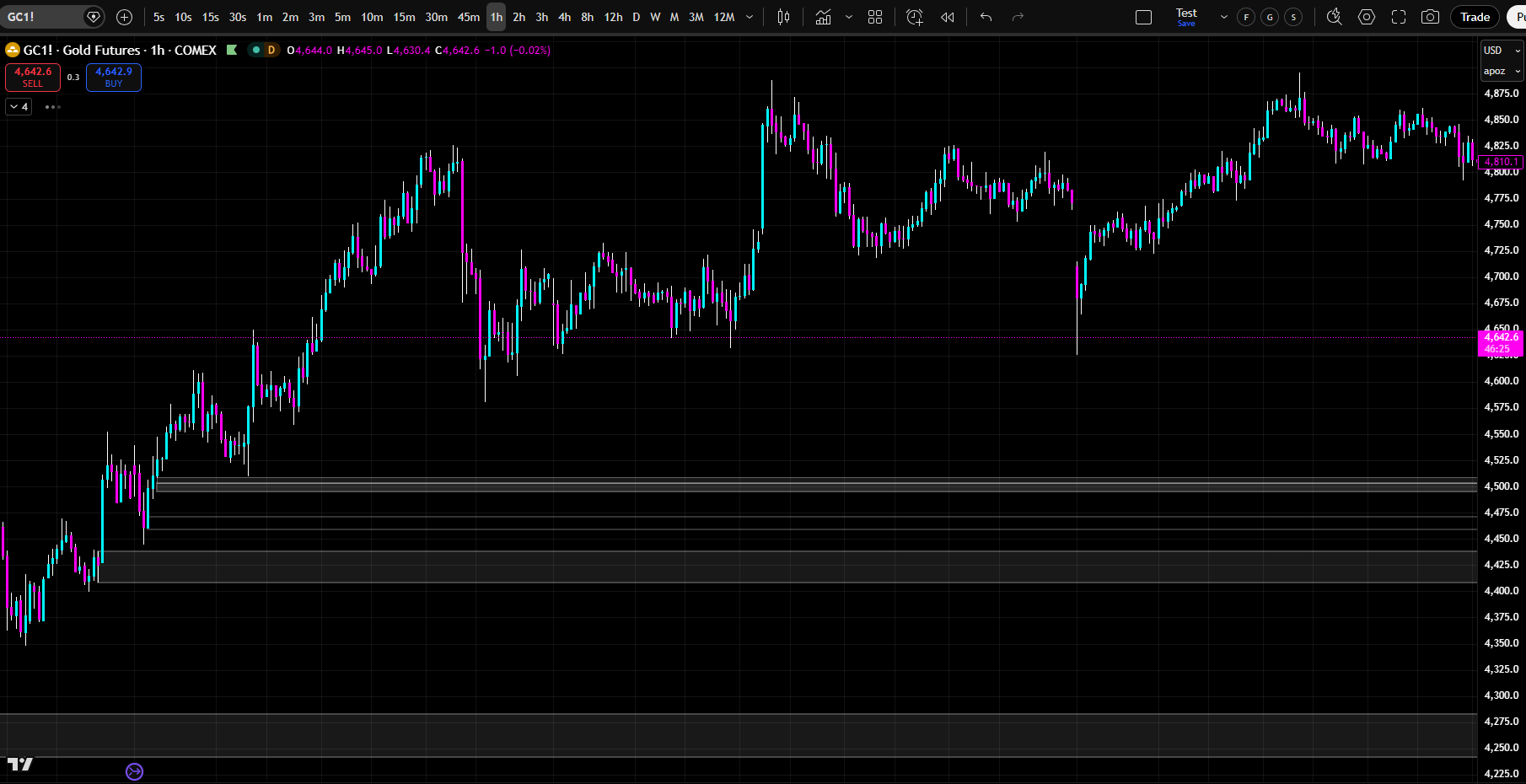
Historical Order Block Display
•
Turn Historical Levels on to see EXACTLY how price reacted in the past when it reached an Order Block (on any timeframe). Use for back-testing and data driven insights
•
Mitigated OBs displayed in cyan (bullish) or pink (bearish)
•
Fixed right edge at the bar where mitigation occurred
•
Per-timeframe historical toggles
Alert Engine
•
OB Detected — new order block identified
•
OB Hit — price touches an OB zone
•
OB Mitigated — OB fully filled past kill threshold
•
Confluence Formed — new confluence zone detected
•
Configurable cooldown to suppress duplicate alerts
•
Customizable alert prefix
•
Now, at the click of a button, you can save HOURS of “manual alert setting” by simply letting the Order Blocks Suite alert engine set your alerts for you in SECONDS
Displacement Settings
•
Multiplier mode: You choose how large the displacement candle must be to “qualify” the Order Block (or just use the default “Alpha” settings)
Styling & Customization
•
Active OB: fill color, fill opacity, border color, border opacity, border width, border style
•
FVG boxes: independent fill, border, and text styling
•
Breaker Blocks: independent fill, border, and text styling
•
Historical OBs: independent bullish/bearish colors, opacity, border style
•
Confluence boxes: independent fill, border, text styling with higher opacity
•
Text size options: Tiny, Small, Normal, Large, Huge
•
Text alignment: horizontal (Left, Center, Right) and vertical (Top, Center, Bottom)
Performance & Optimization
•
Visible price filter prevents drawing OBs far off-screen
ORDER BLOCKS Suite By Alpha Intelligence
See Where Institutional Traders Accumulated Positions.
Trade Where Orders Are Waiting to Be Filled.
Order Blocks Suite is the most sophisticated institutional order and liquidity identifying system ever built for TradingView.
✕
✕Order blocks are zones where institutional traders have accumulated positions.
✕They represent areas where large orders have been placed, creating supply or demand imbalances that persist until price returns to those zones.
✕When price returns to an order block, the original orders are still there, waiting to be filled. This creates predictable price behavior.
Most traders don't understand order blocks.
They don’t see where institutional traders are positioned.
They don’t know where price is likely to react.
They trade without seeing what institutional traders see.
Order Block Suite & Our Proprietary Framework Changes Everything.
IT DOES THE WORK FOR YOU
You Don’t Have to Know Why It Works.
Just Watch It Work.
Professional traders use order blocks as their primary trading levels.
Order Blocks Suite gives you institutional-grade order block analysis that shows you exactly where institutional traders have accumulated positions at every timeframe.
Don’t Understand Order Blocks, Breaker Blocks, or FVGs? It Doesn’t Matter!
You don’t have to know any of that.
The indicator already knows. It plots every level for you, automatically, in real time, across every timeframe that matters.
Just turn it on. Watch what happens when price reaches the levels it plots.
Use the historical levels function and scroll back through any chart — you will see it for yourself.
These levels work. Visibly. Repeatedly. Undeniably.
GET STARTED TODAY
One Plan. Everything Included. Any Market.
$59 / month
Less than one bad trade.
Less than LuxAlgo’s single-tier plan.
Less than the cost of one month of “figuring it out yourself.”
No contracts. No hidden fees. Almost INSTANT TradingView access. Any chart. Any market. Cancel anytime. But You Won’t…