Naked POC Suite Tutorial
Learn how to use Naked POC Suite to find where institutional traders spent the most time and trade high-probability POC zones.
Watch The Below Video!
Almost INSTANT TradingView access. Any chart. Any market. Cancel anytime.
Naked POC Suite Complete Institutional Indicator Tutorial
What You Will Learn
In this tutorial, you will learn how to use Naked POC Suite to identify exactly where institutional traders spent the most time at every timeframe. You will understand how to read Point of Control levels, identify POC as a magnet for price, and find confluence zones where multiple timeframes agree on a price level.
Find the exact price levels institutions are defending — and where price is being pulled.
How Naked POC Works
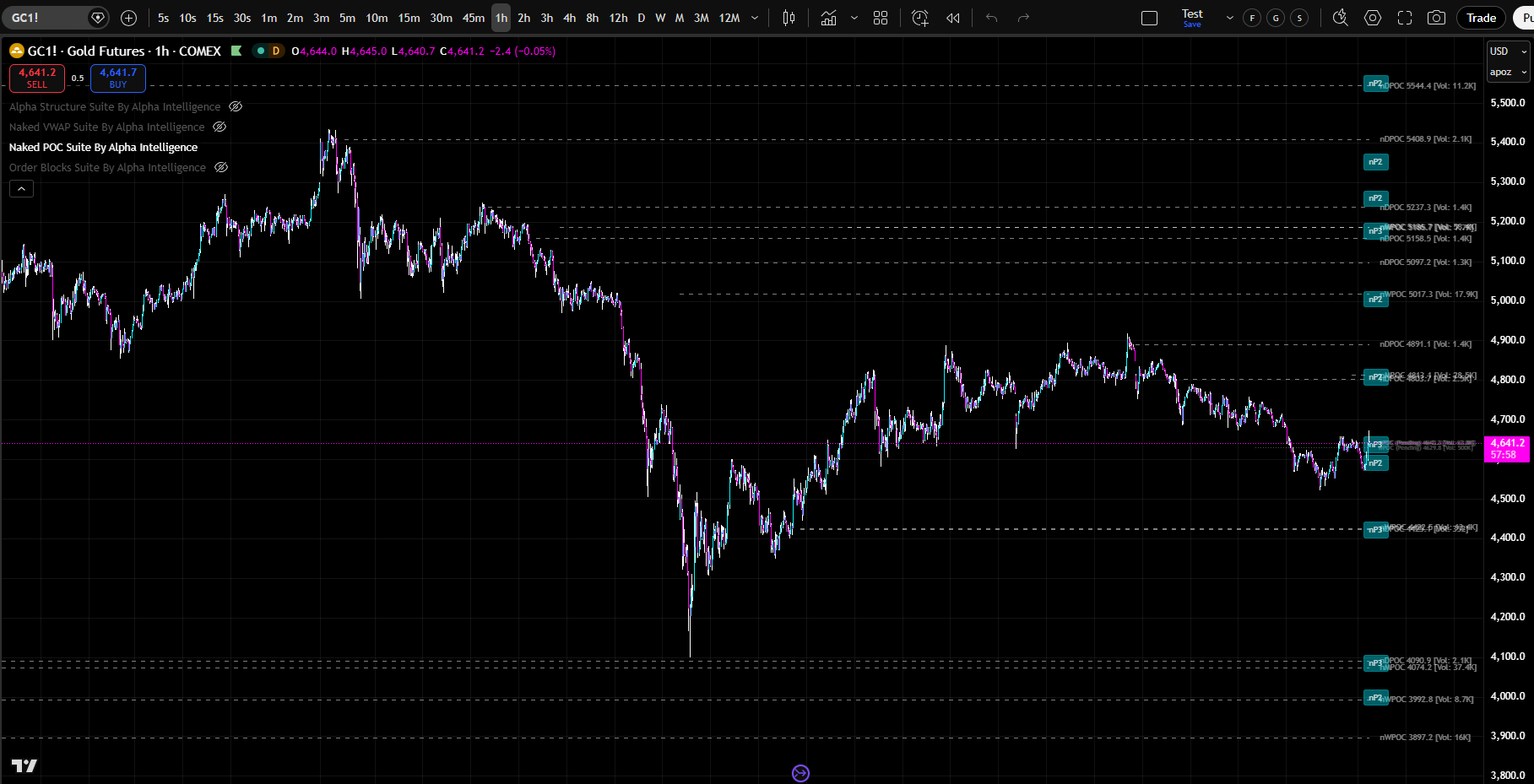
ABOUT "NAKED" POCs & VOLUME PROFILES
•The level with the most volume is the Point of Control — the price where institutional traders spent the most time.
•This is where institutional orders are clustered. This is where price is most likely to react.
•When price moves away from POC, it creates an imbalance. When price approaches POC from below, institutional sellers are waiting. POC is a magnet for price.
•Professional traders use POC as their primary reference level. They understand that POC is where institutional activity is concentrated.
•These naked POCs are some of the most reliable support and resistance levels in all of trading because they represent prices where massive volume transacted but the market never came back to settle the score.
•They know that when price approaches POC, a reaction is likely. They trade POC bounces as high-probability signals
•The Naked POC Suite tracks these levels automatically across 8 independent timeframes, from Asia, London, NYC Sessions & Kill Zones, and from Daily all the way through Monthly. identifies where multiple naked POCs converge at the same price to form high-probability confluence zones, and alerts you in real time when price approaches or hits a key level.
•The Suite also identifies where multiple naked POCs converge at the same price to form high-probability confluence zones, and alerts you in real time when price approaches or hits a key level.
•If you were to plot every naked POC level manually, it would take you hours to do, on just a SINGLE chart / asset.- •
Our Suite does it in just SECONDS and can plot them FOR YOU on every chart you pull up in TradingView forevermore.
This is how institutions see the market, and where they do business — now you can too.
MULTI-TIMEFRAME POC CONFLUENCE
Know exactly where institutional traders are positioned – BEFORE price gets there.
•
Naked POC Suite calculates POC simultaneously across eight period engines. When multiple sessions have POC levels at the same price zone, that is institutional confluence. That is where the strongest reactions occur.
•
Imagine seeing that the Daily POC, Weekly POC, and London Session POC are all clustered within a tight price zone. That is not just a trading level.
•
That is a high-probability support or resistance zone. That is where institutional traders across multiple sessions spent the most time. That is where price will react with force.
•
This is what Naked POC Suite shows you. This is what separates professional traders from retail traders.
•
Naked POC Suite identifies zones where multiple POC levels from different sessions cluster together.
•
These are the highest-probability trading zones.
•
When price approaches a POC cluster, prepare for a strong reaction.
•
When price breaks through a POC cluster, a new trend is forming.
•
POC clusters are where institutional traders are most active. They are where the most volume has traded across multiple sessions. They are where price is most likely to reverse or accelerate.
WHAT IS INCLUDED IN NAKED POC SUITE?
Dual Detection Engines
•
Alpha Mode (proprietary): proprietary confirmation rules & phantom level system — fewer false signals, more conservative
•
Standard/ICT Mode: Industry-standard 3-candle pivot detection with CHoCH and HH/HL/LH/LL classification
•
•
Switch between engines anytime with a single dropdown
10 Simultaneous Timeframes•
Up to 10 independent timeframe slots running at once
•
Each slot has its own confirmed highs/lows, trend direction, and structural events
•
Each timeframe’s highs/lows you choose are plotted on whatever timeframe chart you are viewing, up to 10 timeframes plotted on a single chart so you always have the full picture
•
Timeframes are sovereign — they do not influence each other
•
Per-slot enable/disable toggles, for full customization
5 Trader Timeframe Templates•
Alpha (default): 1m, 5m, 15m, 30m, 1H, 4H, 12H, D, W, M
•
Scalper: 1m, 3m, 5m, 10m, 15m, 30m, 1H, 2H, 4H, D
•
Day Trader: Same as Alpha
•
Swing Trader: 15m, 30m, 1H, 4H, 12H, D, 3D, W, M, 3M
•
Investor: 1H, 4H, 8H, 12H, D, W, M, 3M, 6M, 12M
WHAT DOES NAKED POC SUITE AUTOMATICALLY PLOT ON YOUR CHART?
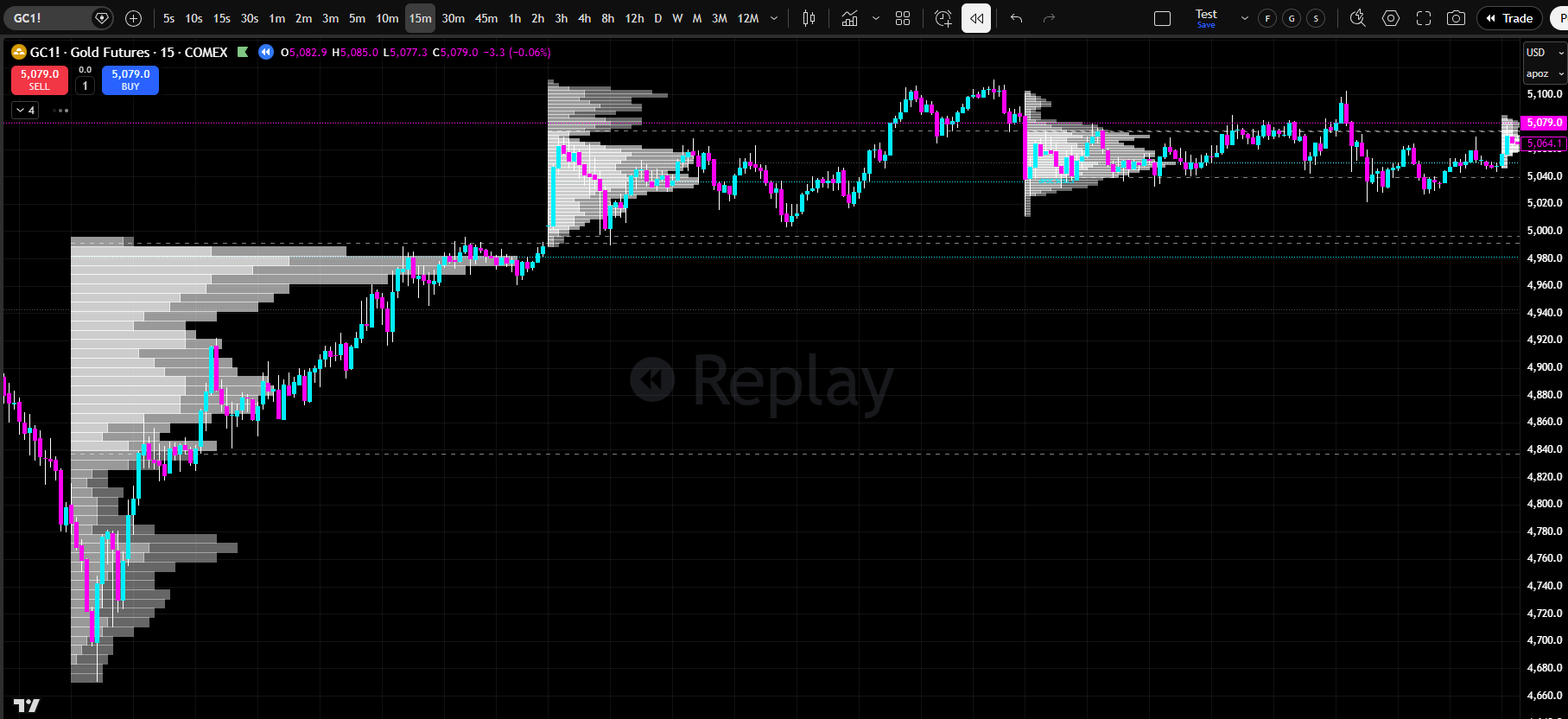
Full Volume Profile Histograms
•
Per-period VP histograms with split up/down volume coloring
•
Value Area distinction (inside VA vs. outside VA — 4 color inputs)
•
Configurable row size (240 default for high resolution)
•
Adjustable width and left/right placement
•
POC, VAH, and VAL lines within each histogram
•
VA Background shading available
•
Extend POC, VAH, and VAL lines to the right to project into current price action
Naked POC Tracking
•
Automatically identifies POCs from completed sessions that price has not returned to
•
Tracks and plots naked POCs across all 8 period types simultaneously
•
Volume displayed on every level’s label so you KNOW which levels matter the most
•
Pending POC, VAH, and VAL
•
See the developing session’s POC, VAH, and VAL updating in real time
•
Know where “fair value” is forming before the session closes
•
Pending levels included in confluence calculations
•
Independent toggles for Pending POC, Pending VAH, and Pending VAL
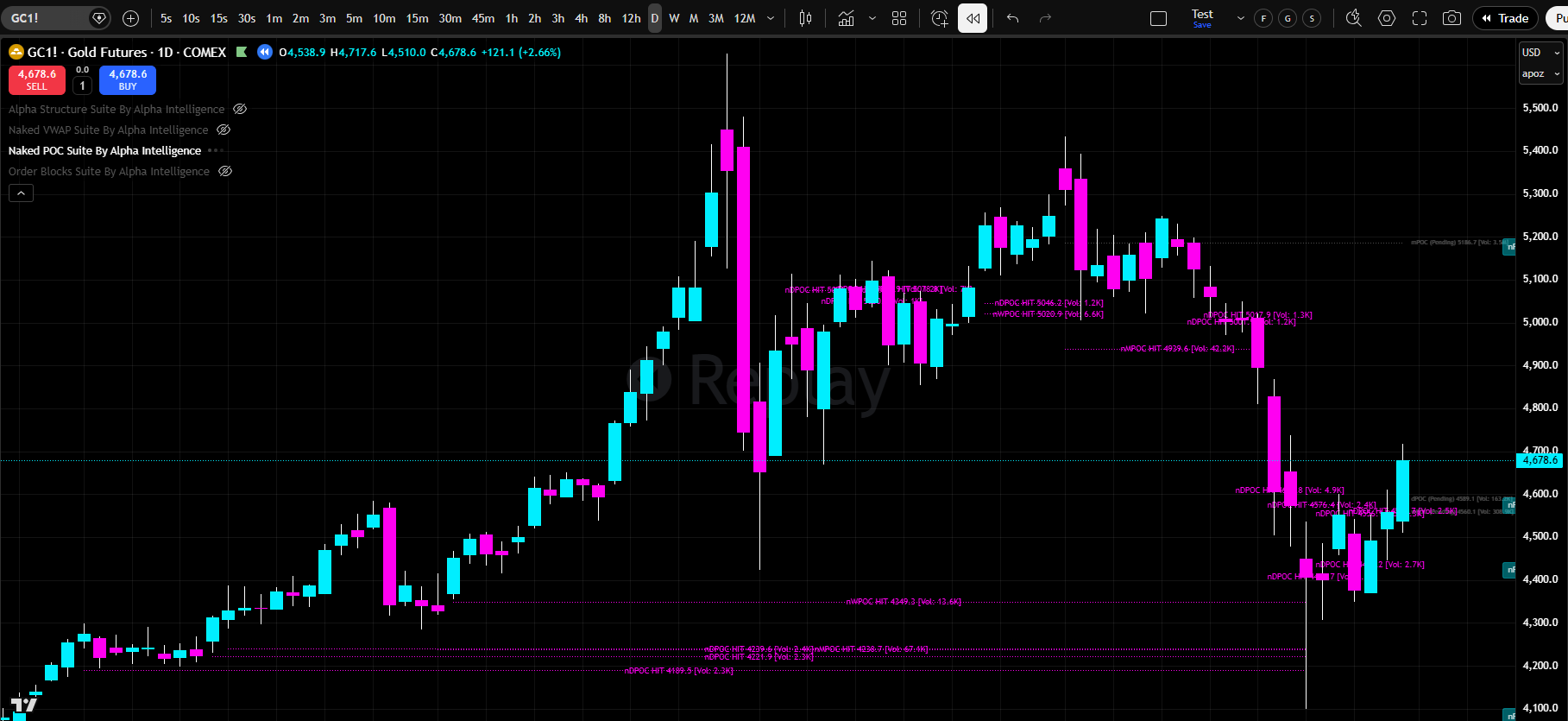
Hit Level Tracking
•
Records when and where each naked POC was mitigated
•
Hit levels displayed in pink with a line spanning from creation to mitigation point
•
Volume preserved on hit labels
•
Per-timeframe hit level toggles
•
OFF by default for a cleaner chart — enable for analysis and back-testing
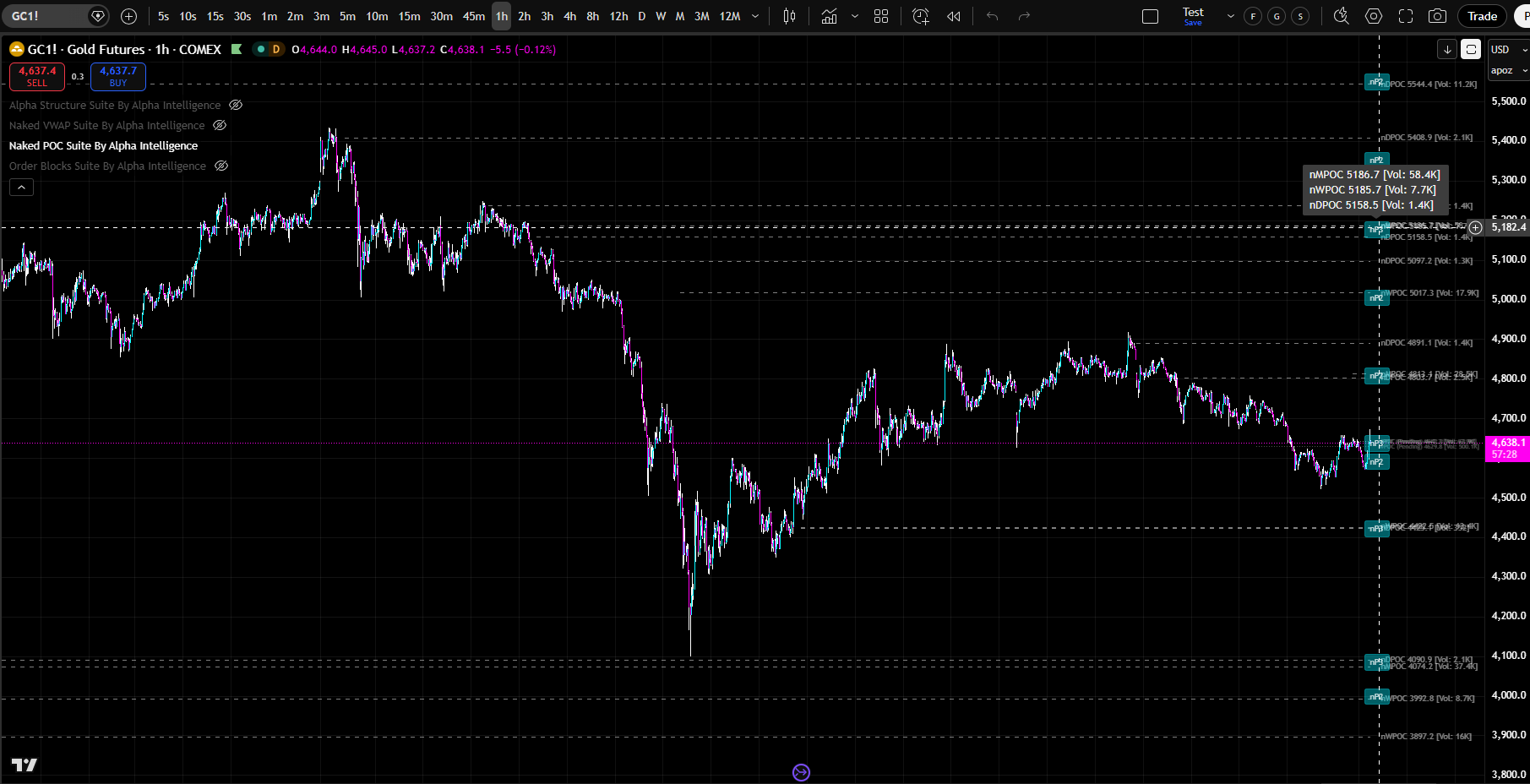
Confluence Cluster Detection
•
Automatically identifies zones where multiple naked POCs from different periods converge
•
Displayed as bubbles with count (e.g., “nP3” = 3 levels clustered)
•
Hover over any bubble to see a tooltip listing each level’s period type, price, and volume
•
Pending POCs included in calculations
•
Configurable cluster tolerance (1.0% default), max bubbles, and minimum levels
FULL CUSTOMIZATION & CONTROL
13 Alert Types
•
nPOC Hit (Any) — any naked POC mitigated
•
New nPOC Created — new level created at session close
•
Pending Touch Tolerance — near-miss warning (within 0.1% of tolerance)
•
Price Approaching nPOC — early warning (within 0.5%)
•
nPOC Cluster Hit — price enters a confluence zone
•
8 per-period hit alerts: nDPOC, nWPOC, nMPOC, nAsiaPOC, nLdnPOC, nNYPOC, nLdnKZPOC, nNYKZPOC
•
Both “Any Alert” and specific named conditions available
•
Customizable alert prefix
•
Turn on the alerts you want, turn off the ones you don’t
•
Alerts automatically attach to every applicable level, saving you hours of “manual alert setting”
Tolerance & Mitigation
•
4 tolerance models: Strict, Percent (0.1% default), Tick (5 ticks default), Hybrid
•
Each model controls how close price must come to register as a hit
Dual-Gate Toggle System
•
Quick toggles in the Naked POCs section for fast on/off per period type
•
Per-session toggles for fine-grained control
Styling & Customization
•
Naked level line style: Solid, Dashed, or Dotted
•
Naked level line color, opacity, and width
•
Independent label color, opacity, and size
•
Label position: Left, Center, or Right (X) and Above, On Line, or Below (Y)
•
Label offset for multi-indicator compatibility
•
Global pending level styling (color, opacity, style, width)
•
Global hit level styling (pink default, independent controls)
Performance & Optimization
•
Visible price range filtering prevents chart zoom-out
•
Configurable max naked levels and max hit levels
•
VP History Count controls how many completed histograms are kept per period (5 default)
Multi-Indicator Compatibility
•
Label and bubble offset inputs prevent overlap with other Alpha Intelligence indicators
How Naked POC Suite Works
•
Naked POC Suite calculates Point of Control across up to ten simultaneous timeframes. POC is the price level where the most volume has traded — it is where institutional traders spent the most time. When price moves away from POC, it creates an imbalance. Institutional traders want to return to POC to fill orders. When price approaches POC, a reaction is likely.
Key Features Explained•
The indicator displays POC levels for each enabled timeframe. Each line is independently customizable — choose colors, opacity, thickness, and style. When multiple POC lines cluster at the same price zone, that is institutional confluence. That is where the strongest reactions occur.
•
The indicator detects POC breaks in real-time. When price closes decisively above or below POC, a new trend is forming. You receive real-time alerts so you never miss a break.
•
Naked POC Suite displays historical POC levels from previous trading periods. See where POC was yesterday, last week, last month. Price has a memory — it returns to zones where significant volume has traded. Historical POC levels are where price is likely to react.
•
The indicator identifies POC clusters where multiple POC levels from different timeframes cluster together. These are the highest-probability trading zones. When price approaches a POC cluster, prepare for a strong reaction.
How to Use It•
Start by enabling the timeframes that match your trading style. Scalpers might use 1m, 2m, 3m, 5m, 10m, 15m, 30m, 1H, 2H, 4H. Day traders might use 5m, 15m, 30m, 1H, 4H, D. Swing traders might use 1H, 4H, D, W, M.
•
Look for POC confluence zones where multiple timeframes have POC levels at the same price. These are high-probability trading zones. •
•
When price approaches a confluence zone, prepare for a strong reaction.
•
Watch for POC breaks. When price closes above POC on high volume, institutional buyers are stepping in. When price closes below POC on high volume, institutional sellers are stepping out. These are directional signals.
•
Use POC as your primary reference level. When price is above POC, the bias is bullish. When price is below POC, the bias is bearish. Trade in the direction of the POC bias.
•
Use historical POC levels as support and resistance. Price returns to zones where significant volume has traded. Historical POC is where price is likely to react.
Customization•
Every POC level is independently customizable. Choose any color, any opacity, any line thickness, any line style. Highlight specific timeframes. Hide timeframes you don’t need. Build the exact trading interface you want.
Real-Time Alerts•
Enable real-time alerts to be notified when POC breaks occur, when POC confluence zones form, when price approaches POC. Never miss a trading opportunity.
Next Steps•
Load Naked POC Suite on your chart. Enable the timeframes that match your trading style. Practice identifying POC confluence zones. Watch for POC breaks. Use historical POC as support and resistance. Start trading with institutional precision.
Click The Image Below To Go To The “Full Product Specs Page”
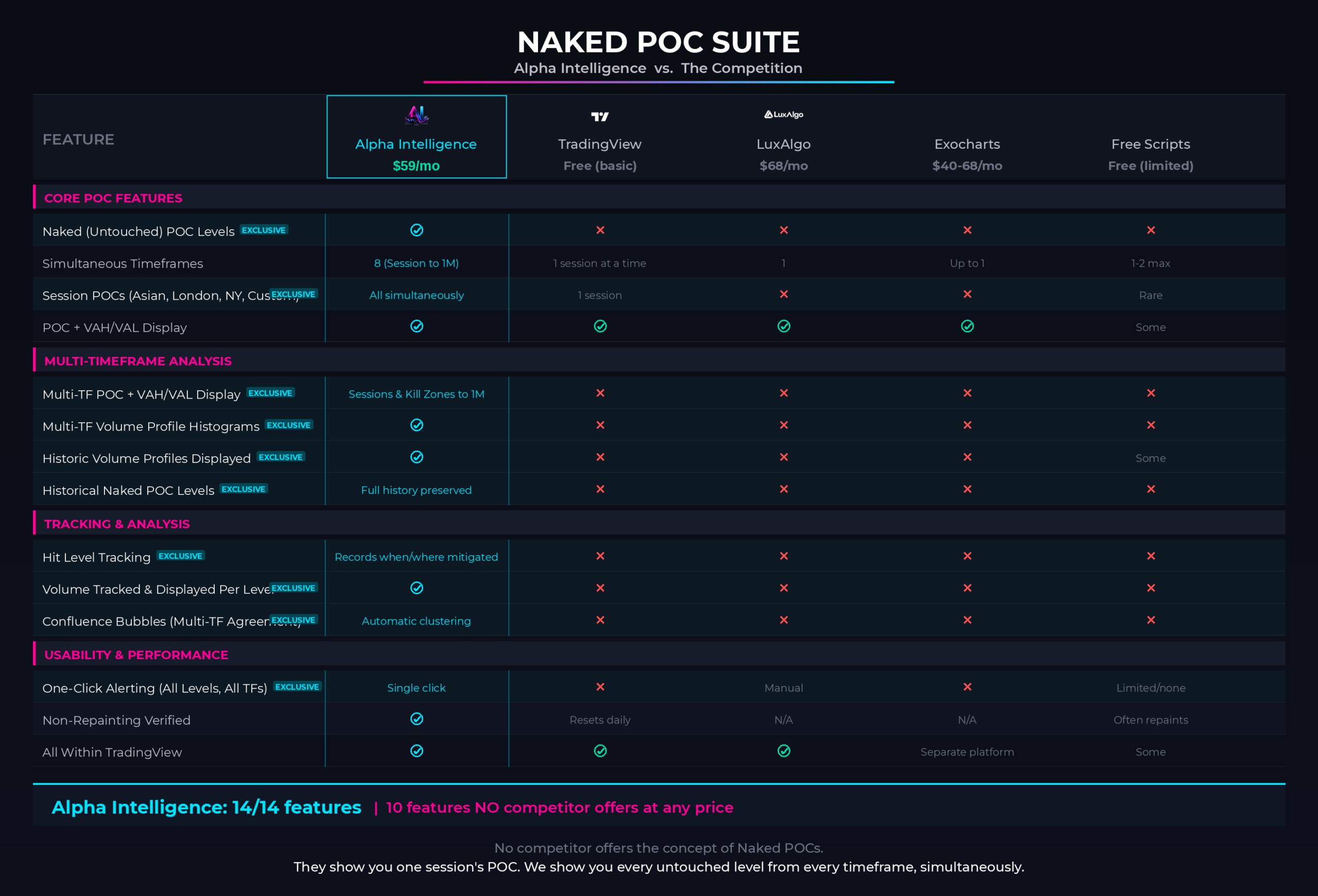
THE COMPETITION DOESN'T COMPARE... AND IT IS NOT EVEN CLOSE
How Does Naked POC Suite
Stack Up Against The TOP Competition?
Naked POC Suite offers features that no other indicator on the market offers, and significantly outperforms anything available to date. Here is how…
*Click on the image below to zoom in.*
✕
There is not a SINGLE indicator in the market that actually offers the “Naked Institutional POC Levels” OR “Multi-TF Volume Profile Displays”. Every wondered… WHY?
✕
Consistently outperforms LuxAlgo’s Volume Profile & POC Indicators.
✕Consistently outperforms TradingView’s Built-In Volume Profile & POC Indicators.
✕Consistently outperforms ExoCharts’s Volume Profile & POC Indicators.
✕Consistently outperforms TradingView’s Free Library of Volume Profile & POC Indicators.
✕And it has 10 features that no other indicator in the ENTIRE indicator’s market offers.
GET STARTED TODAY
One Plan. Everything Included. Any Market.
$49 / month
Everything. Every indicator. Every market. Every timeframe. One price.
•The complete Alpha Intelligence indicator suite — every tool, fully unlocked.
•Almost INSTANT TradingView access. Any chart. Any market. Cancel anytime.
•Any market — stocks, crypto, forex, futures, commodities.
•Any timeframe — from 1-minute scalps to monthly swing trades.
•Full customization — colors, timeframes, alerts, labels, modes. Make it yours.
•Real-time alerts on every indicator — across every level, every session, every timeframe. One click.
•Tutorial videos for every indicator — so you are never lost.
•Ongoing updates, new features, and new indicators as they are released.
Cancel anytime. No contracts. No hidden fees. Almost INSTANT TradingView access. Any chart. Any market. Cancel anytime.
Are You Ready To Trade With Institutional Precision?
Enter Your Email And Subscribe To All Alerts And Trainings (Free To You)!
Once You Press Submit, BUCKLE UP Because You Are In For One Heck Of A Ride!
You're All Set!
Check Out The Video On This Page...
And JOIN US!
You can close this now. It will auto-close in 5 seconds.
Are You Ready To Trade With Institutional Precision?
Enter Your Email And Subscribe To All Alerts And Trainings (Free To You)!
Once You Press Submit, BUCKLE UP Because You Are In For One Heck Of A Ride!
You're All Set!
Check Out The Video On This Page...
And JOIN US!
You can close this now. It will auto-close in 5 seconds.